Kako snimiti panoramu
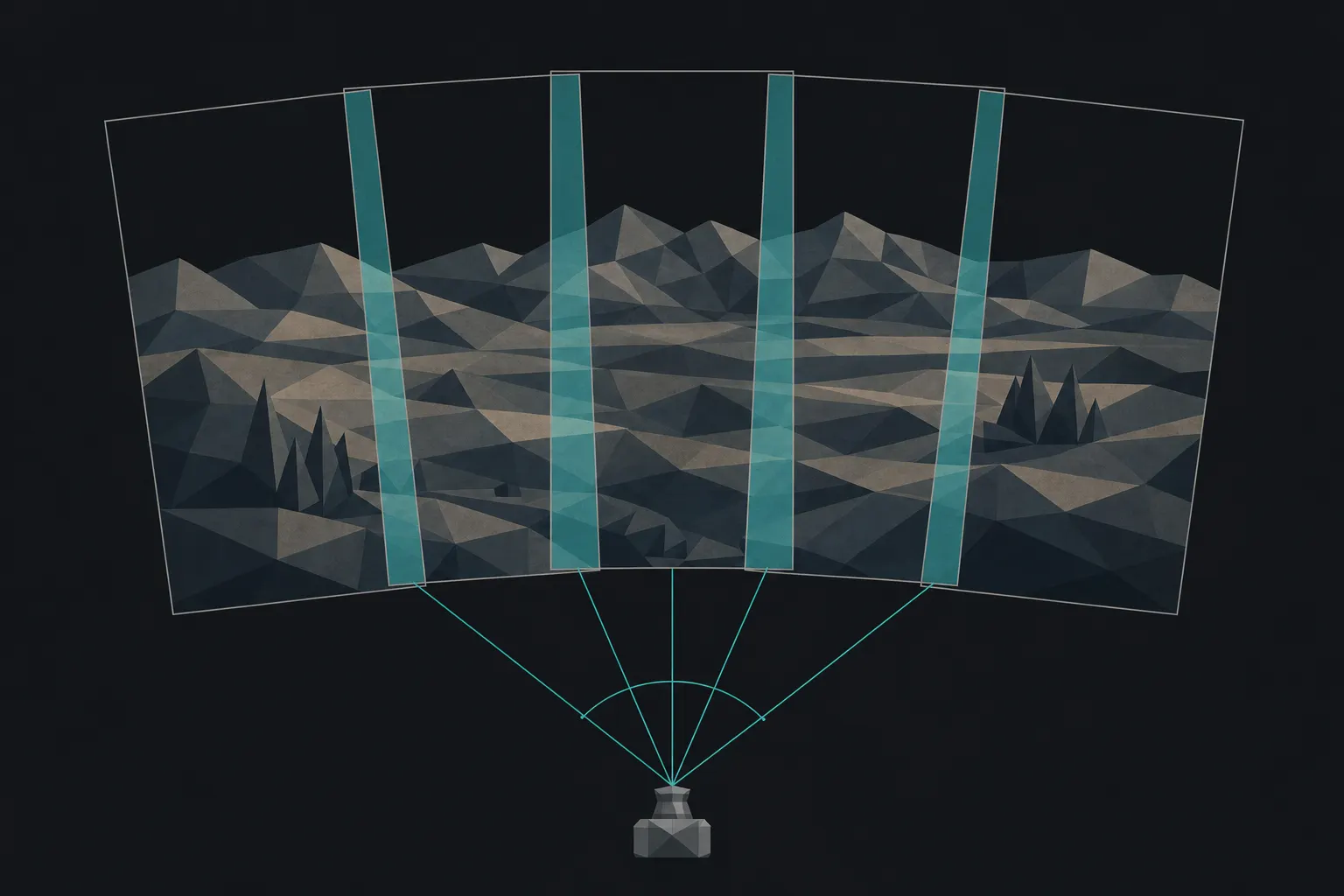
Panorama obećava rezoluciju i zahvat koji nijedan pojedinačan kadar ne može da zadrži; propada na spoju koji se vidi. Cela disciplina je doslednost između kadrova: program za spajanje može da poravna geometriju, ali ne može da pomiri kadar koji je izmeren svetlije od suseda, koji se ponovo fokusirao usred zahvata ili kome je boja odlutala. Zato sve što bi aparat rado automatizovao mora biti ZAKLJUČANO: ručna ekspozicija izmerena jednom za ceo prizor, ručni fokus postavljen jednom, fiksan balans bele koji ne može ponovo da odlučuje za svaki kadar. Preklopi svaki kadar 30–50%, da program za spajanje ima zajednički detalj po kome usklađuje kadrove. Paralaksa je važna samo kada postoji bliski prednji plan: okreći aparat oko bilo koje tačke osim tačke bez paralakse objektiva (ulazne zenice, nepreciznije zvane nodalna tačka) i bliski i daleki predmeti će se između kadrova pomeriti jedni u odnosu na druge, a spoj će se pocepati na tom neslaganju; kod udaljenog prizora to je zanemarljivo, kod stene u prednjem planu to je cela igra. Jedan red pokriva horizont; visok subjekat traži više redova ili vertikalni zahvat. I najpre postavi iskreno pitanje: panorama, ili jednostavno širi objektiv? Posegni za zahvatom kada želiš više rezolucije nego što jedan kadar drži, ili kompoziciju koju bi širok objektiv izobličio na ivicama, jer program za spajanje može da preslika zahvat na zakrivljenu (cilindričnu) projekciju, dok širok objektiv sliku izravnava razvlačeći uglove; cena je to što se prave linije daleko od horizonta blago savijaju.
Polazne tačke
- Režim
- Ručni: jedino oko čega nema pregovora. Bilo šta automatsko ponovo pregovara o ekspoziciji, fokusu ili balansu bele između kadrova, a svako ponovno pregovaranje je spoj koji program za spajanje ne može da sakrije.
- Ekspozicija
- Izmeri za ceo raspon preko kog ćeš preći, od najsvetlijeg do najtamnijeg, postavi ekspoziciju ručno i ostavi je. Kadar koji je posvetleo usred zahvata ostavlja pojas koji nijedan spoj ne može da stopi.
- Preklapanje
- 30–50% od kadra do kadra. Program za spajanje usklađuje po zajedničkom detalju; daj mu veće preklapanje preko praznog neba ili vode, gde ima manje za šta da se uhvati.
- Fokus i balans bele
- Oba zaključana ručno. Autofokus koji se ponovo fokusira između kadrova pomera ravan i omekšava spoj; automatski balans bele preboji boju preko spoja. Podesi svako jednom, pa ih više ne diraj.
- Nivelisanje i tačka okretanja
- Izravnaj glavu stativa da se horizont ne penje ili ne spušta tokom okretanja. Sa bliskim prednjim planom okreći oko tačke bez paralakse objektiva (ulazne zenice), a ne oko zavrtnja stativa: okretanje van te tačke pomera blisko u odnosu na daleko i cepa spoj.
- Orijentacija
- Snimaj kadrove uspravno za veće vertikalno pokrivanje po zahvatu. Jedan red za horizont; više redova ili vertikalni zahvat za visok subjekat.
Na terenu
- Prvo isplaniraj zahvat: gde počinje, gde se završava, i najsvetlije i najtamnije delove preko kojih će preći.
- Izravnaj glavu da horizont zadrži liniju kroz celo okretanje.
- Izmeri jednom, fokusiraj jednom, podesi balans bele jednom, sve ručno, pa ne diraj nijedno od toga troje.
- Preklopi svaki kadar 30–50% sa prethodnim; povećaj preklapanje na nebu ili vodi bez detalja.
- Za bliski prednji plan okreći oko tačke bez paralakse; za udaljen prizor, obično okretanje je dovoljno.
- Snimaj brže nego što se svetlo menja: sunce koje se pomera ili oblak koji plovi menja ekspoziciju dok spori zahvat još traje.
Kada ne uspe
- Svetao ili taman pojas preko spoja
- Ekspozicija se promenila usred zahvata, i upravo zato je režim ručni. Automatska ekspozicija ponovo meri svaki kadar, a program za spajanje ne može da stopi dve različite svetline u jedno neprekidno nebo. Izmeri jednom za ceo prizor, postavi ekspoziciju ručno i snimaj brže nego što se svetlo pomera.
- Sablasna, napola prisutna figura na spoju
- Nešto se pomerilo između dva kadra koja se tu preklapaju: prolaznik, automobil, grana na vetru. Program za spajanje je imao subjekat u jednom kadru, a u drugom ne, pa stapa duha. Prelazi brzo, sačekaj da se zone preklapanja isprazne, ili tempiraj okretanje tako da pokretni subjekti padnu unutar jednog kadra, a ne preko spoja.
- Pruge ili oštar skok na vedrom nebu
- Gladak prelaz bez detalja ne daje programu za spajanje ništa na čemu bi poravnavao, pa se mali pomak ekspozicije ili balansa bele vidi kao jasan skok. Povećaj preklapanje preko neba, zaključaj balans bele na fiksnu unapred zadatu vrednost da boja ne može da odluta i snimaj RAW da bi prelaz preživeo obradu bez posterizacije.
Niz je gotov? Dobij iskreno čitanje.
Tehnika sklapa kadrove; kritika čita rezultat. Otpremi gotovu sliku (za tajmlaps, jedan izdvojen kadar) i FinalFrame vraća punu dijagnozu: šta funkcioniše, šta ograničava kadar, i da li je lek za stolom ili ponovo na terenu.
Kritikuj fotografiju